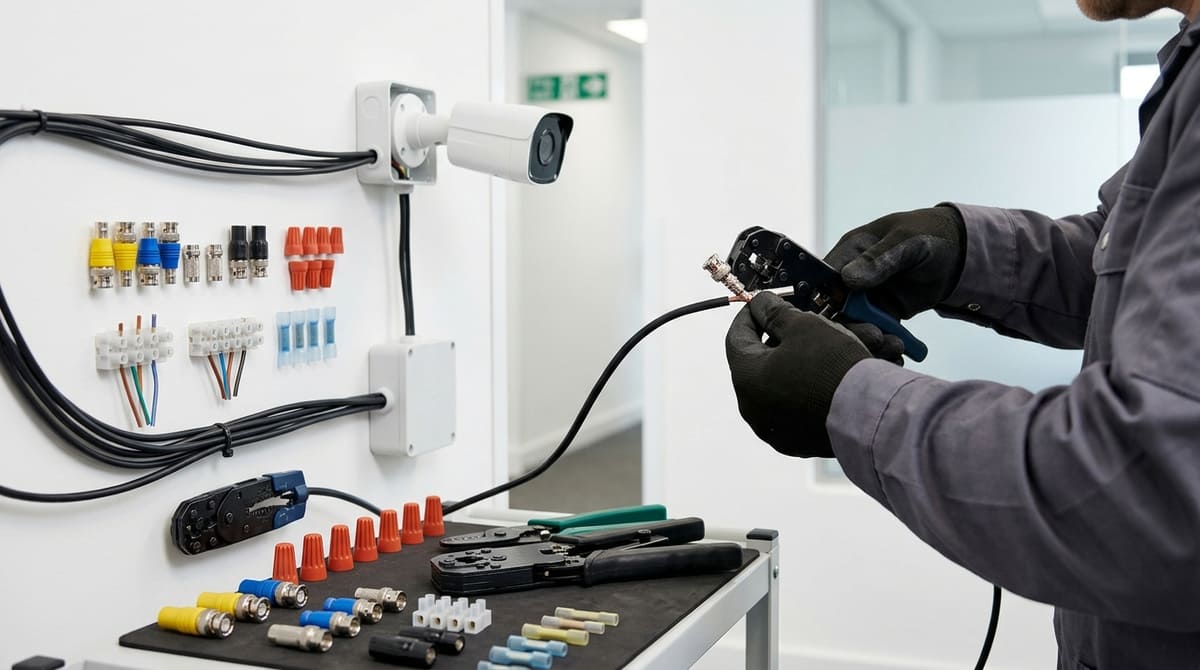
The right connector is decided by what's inside the cable and the equipment it terminates at, not by brand, price, or habit: coax video normally takes a BNC, Ethernet data an RJ45, and bare power or signal cores a lever or IDC connector sized to the conductor — mix them up and you've built tomorrow's callback. The qualification that's easy to miss is that "connector type" and "conductor size" are two separate decisions, and getting the family right (BNC vs RJ45 vs lever) means nothing if the gauge rating inside that family is wrong.
Which connector matches your CCTV cable?
Match the connector to the cable's contents and the equipment at each end: coax video cores usually take BNC connectors, Ethernet data cores RJ45, and bare power or signal cores lever or IDC connectors rated for the conductor size.
In practice that means never forcing one family onto another's cable. Pushing a coax core into a screw terminal meant for a stripped wire, or trying to crimp RJ45 onto a solid coax feed, gives you a joint the connector was never designed to make — and a likely return visit to a CCTV job.
Match the connector to what's actually inside the jacket, every time:
| Cable type |
Connector needed |
| Coax analogue / HD-TVI / AHD |
BNC on the video core, plus a separate 2-core power connector where power runs on its own cores |
| IP camera over Cat5e/Cat6 |
RJ45 connector, or a coupler if extending a run |
| 12V/24V power distribution to multiple cameras |
Lever or push-wire connector rated for the conductor cross-section |
| Analogue or HD-over-coax camera sent over Cat5e/Cat6 |
Passive video balun at each end — carries the analogue signal over twisted pair to a BNC input on a DVR or hybrid recorder; does not convert it to IP |
Coax cameras: BNC plus a separate power core
Analogue, HD-TVI and AHD cameras carry video on a coax core, so that core terminates in a BNC connector — never a screw terminal or a lever connector, which aren't designed for coax's centre conductor and braid. Where power isn't carried over the coax, the 12V or 24V side is a separate two-core run and takes its own connector, kept distinct from the video path entirely — choose one whose stated conductor range and current rating suit that cable.
Outdoors, any BNC or power joint needs a connector rated for the environment and proper environmental protection, such as a weatherproof boot, self-amalgamating tape or a junction box — a compression fitting alone isn't automatically weatherproof, and a poorly sealed joint can produce anything from a dead picture to an intermittent fault as moisture works its way in.
IP cameras: RJ45 on Cat5e or Cat6
Wired IP cameras run data and, on PoE installs, power over the same Cat5e or Cat6 cable, so the termination is normally an RJ45 connector at both ends — camera and switch or NVR. Where a pre-terminated lead will do the job, Euro CCTV's range includes a Cat6 patch lead with snagless, gold-plated RJ45 plugs rated to 250MHz bandwidth, plus a shielded (F/UTP) Cat6 patch lead for runs near electrical noise; gold plating on the contacts helps resist corrosion, though it's one factor among several in long-term PoE reliability.
Extending a run rather than re-terminating at the camera calls for an RJ45 coupler rather than another plug-and-socket pair.
Power distribution: lever connectors sized to the core
Where one PSU feeds several cameras, the join is bare copper, not coax or Cat6, so the right connector is a lever or push-wire type rated for the conductor's cross-sectional area rather than a generic crimp.
This is the same category the trade calls connectors for electrical wires or connectors for 2 wires when spec'd for mains and low-voltage runs alike — check the manufacturer's stated conductor range and current rating before loading a connector with camera feeds, since undersizing it against the conductor is a fault that can surface as a callback later. Euro CCTV's connectors range includes lever and push-wire connectors for this power-distribution side alongside RJ45 patch leads.
Carrying coax-camera video over twisted pair
Where an analogue or HD-over-coax camera (HD-TVI, HD-CVI, AHD or CVBS) has to reach the recorder over Cat5e or Cat6 rather than coax, a pair of passive video baluns — one at each end — carries that analogue signal over a twisted pair, from the camera's BNC output to a BNC input on a DVR or hybrid recorder. It does not convert the signal to IP, so it can't feed an IP-only NVR or put an IP camera on a coax run, and an RJ45-shaped socket on a balun doesn't make it Ethernet-compatible. Each balun still needs a properly made BNC connection to perform as specified.
What are the different types of wire connectors?
Four families cover CCTV work: lever or push-wire connectors for power splicing, screw terminal blocks, crimp or IDC connectors for low-voltage cable, and signal-specific plugs like BNC and RJ45 for video and data transmission.
Each family exists for a different task — power splicing, permanent low-disturbance joins, or signal transmission — so choosing on price alone rather than on conductor type and job is an easy route to a failed joint.
TE Connectivity's own catalogue lists roughly 64,000 connector types across power, signal and data categories — a measure of how job-specific this hardware is, per the TE Connectivity connector overview.
Lever/push-wire connectors
These are tool-free connectors that clamp solid or stranded conductors within a stated mm² range without a screwdriver. Lever types — the WAGO 221 series is the widely recognised example — open and close with a lever and are designed to be reused; push-in (push-wire) types grip the conductor with a spring as it's pushed home, and whether one can be released and reused depends on the design, so check the manufacturer's instructions. Lever types are a common choice for CCTV PSU splitting and junction-box power joins where an installer may need to add or remove a tap later without disturbing the whole loom.
Lever connectors of this kind are available in a range of way-counts, from small 2-way blocks up to larger distribution blocks, plus dedicated splitter designs aimed at CCTV power runs. Check the manufacturer's stated conductor range and current rating against your cable before specifying one, rather than assuming any given block covers your gauge.
Screw terminal blocks
Screw terminals hold a conductor under a tightened screw rather than a spring clamp. The trade-off is that a screw joint can loosen with vibration or thermal cycling if it isn't tightened as the manufacturer specifies, so it's worth checking whenever the enclosure is opened for maintenance.
They still have a place where the joint stays accessible for future inspection.
Crimp/IDC connectors
Insulation-displacement crimp connectors form a permanent joint by piercing the conductor's insulation rather than requiring it to be stripped first, and they're a common choice for telephone and low-voltage cable splicing. A jelly-filled IDC crimp connector is one possible way to splice telephone or other low-voltage cable, giving a sealed, low-disturbance joint that isn't meant to be reopened — it isn't the typical way to terminate a camera's power feed.
That permanence is the appeal for low-voltage signal splices where a lever connector's reusability isn't needed — check the specific connector's rating before using one on an external run.
Signal-specific plugs: BNC and RJ45
Video and data don't use power connectors at all — they need connectors engineered for signal integrity, which is where BNC (analogue and HD-over-coax video) and RJ45 (Ethernet/PoE) plugs come in. Passive baluns can carry compatible analogue video signals over twisted-pair cable rather than coax, but they don't convert the signal to IP — that distinction matters when someone assumes a balun will let an analogue camera speak to a network switch.
Gold-plated RJ45 plugs also come ready-fitted on pre-terminated leads, such as the 10m Cat6 patch lead with snagless, gold-plated plugs in our range, rated to 250MHz bandwidth for Gigabit Ethernet camera and NVR links; the gold plating on the contacts is generally understood to help resist corrosion where the plug mates with the socket, though it's one factor among several in a reliable PoE run. A shielded alternative, the 30m shielded Cat6 patch lead, is fitted with gold-plated, ISO/IEC-certified plugs for installs where shielding matters more than cost.
Where a BNC connection sits outdoors, a compression-type joint plus a suitably IP-rated boot or enclosure is what protects it — a bare compression fitting on its own isn't inherently weatherproof, and a loose or corroded joint can show up as either an intermittent or a dead picture rather than one symptom pointing reliably to the other.
| Connector type |
Best for |
Reusable? |
| Lever |
CCTV PSU splitting, power junctions |
Yes, by design |
| Push-wire (push-in) |
Inline power joins |
Depends on design — check the manufacturer's instructions |
| Screw terminal |
Accessible power joints |
Yes — check tightness at maintenance visits |
| Crimp/IDC |
Telephone/low-voltage permanent splice |
No |
| BNC/RJ45 |
Analogue and HD-over-coax video / Ethernet and PoE data |
Depends on connector design |
Browse the connectors category before specifying a job, since matching connector to conductor and duty is what actually prevents callbacks. If you're not yet set up, open a trade account before you order.
BNC connectors for coax: what to check before you buy
The connector's centre-pin bore must match your coax core diameter; a mismatch can cause intermittent picture loss even though the connector fits and crimps down visually.
The check that matters isn't "is it a BNC" but whether the connector's centre-pin bore matches your coax core diameter — get that wrong and you risk intermittent picture problems rather than a solid image. CCTV coax typically uses a thin solid or stranded copper core, and a bore sized for a different cable will grip loosely even though the connector "fits" and crimps down fine visually.
That mismatch is easily logged as a camera fault, when the camera and DVR may both be working correctly and the fault sits at the connector instead.
The symptom can be distinctive once you know what to look for: snow or rolling noise on screen that comes and goes with vibration, temperature swings, or someone knocking the cable run, rather than a dead picture. A poor connection can produce a range of symptoms rather than one fixed pattern, which is why a loose-bore BNC can get mistaken for a camera or DVR issue and cost a return visit.
Compression vs twist-on: which to fit where
Compression BNC connectors are a common default for external or long-term runs because the connector is compressed onto the cable with a dedicated tool, giving a firmer, more vibration-resistant joint than twist-on types typically manage outdoors — though any outdoor connection still needs a suitably rated connector and proper weatherproofing, such as a boot, self-amalgamating tape or a junction box, to stay watertight over time. Twist-on or screw-type BNCs go on faster with no crimp tool, which suits quick internal patch leads or low-disturbance indoor runs where the connector isn't exposed to weather cycling or repeated movement — but they're more prone to working loose over time outdoors, which fits the intermittent fault pattern described above.
| Type |
Best suited to |
Trade-off |
| Compression BNC |
External runs, rooftops, long-term installs |
Needs a compression tool; correct bore size still critical; outdoor joints still need proper weatherproofing |
| Twist-on/screw BNC |
Internal patch leads, low-disturbance runs |
Faster to fit, more prone to working loose outdoors |
When you need twisted-pair instead of coax
Not every run stays coaxial end to end — where you need to carry video over structured cabling instead, a passive balun carries compatible analogue video over twisted-pair without converting it to IP. It does not turn an analogue camera into a network device; it simply lets the video signal travel over a UTP pair instead of coax, which can be useful where coax isn't practical or where twisted-pair cabling is already in place.
Whichever connector type you fit, check the bore against the cable's core diameter before crimping, not after — a mismatch that looks fine on the bench is where an intermittent fault can start.
RJ45 connectors for IP and PoE cameras
RJ45 is the connector wired IP cameras and PoE runs normally use, and for CCTV the two things worth checking beyond "does it click in" are gold-plating on the contacts and whether the plug is shielded. A crimp that seats and clicks can still be a poor long-term connection if the pins aren't plated properly, so it pays to look past the click test.
Gold plating on the contact pins helps resist the corrosion that can build up on poorly plated pins in damp spaces. This matters more on CCTV than on office data cabling because cameras sit in lofts, external enclosures and roof spaces where condensation is common, and a PoE circuit carries both data and the switch's power feed down the same pins — a corroded contact can affect both at once. We wouldn't rank plating above every other cause of PoE faults (loose crimps and damaged cable jackets cause their share of failures too), but it's one of the cheaper things to get right before you close up an enclosure. Our 10m Cat6 patch lead has gold-plated, snagless RJ45 plugs, and our 5m Cat6 patch lead is also fitted with gold-plated connectors.
Shielded vs unshielded plugs
Shielded RJ45 plugs are built to pair with shielded cable — F/UTP or S/FTP — and matter most where a run tracks close to mains wiring, motors, or other sources of electrical noise. A shielded plug on unshielded cable has no screen to carry on, and an unshielded plug on shielded cable normally leaves the screen unbonded at that end — either way you get the bulk and cost of shielded parts without a properly screened run. Shielding only does its job when the whole channel — cable, plugs and the equipment or patch panel at each end — is screened and correctly terminated.
Our range includes a shielded Cat6 patch lead alongside the unshielded gold-plated leads, for runs that need it. Account pricing applies on both — open a trade account to see it.
What to check before you crimp
- Plating: gold-plated contacts help resist corrosion where the plug mates with the socket — worth checking before assuming any RJ45 plug is fit for an outdoor cabinet or loft run.
- Shielding match: shielded plug with shielded cable, unshielded with unshielded — mixing the two defeats the purpose.
- Snagless boot: reduces the chance of the retention clip catching and breaking during a cable pull through joists or trunking.
Our connectors range covers RJ45 patch leads alongside the lever and push-wire connectors used on the power side of a CCTV install.
Lever connectors for CCTV power: which pack size do you need?
The conductor cross-section in mm² printed on the housing matters more than port count; undersized or oversized conductors in a lever or push-wire terminal can work loose or overheat under load.
The pack size you need depends on the conductor cross-section the lever connector accepts, not just the number of camera outputs on the block — check the mm² figure printed on the housing before ordering. Lever and push-wire connectors are a common way to split a single PSU output across several cameras on a CCTV power run, replacing twisted joints or wrapped tape with a spring-clamp terminal — and lever types can be reopened if the run changes later.
The number that actually matters is the conductor range, not the port count. A connector might offer three, five or eight ports, but if your camera feed cable and PSU tail don't both sit inside the stated mm² window, the spring contact won't grip reliably. On a live 12V or 24V CCTV power circuit that's a fault and fire risk, not just a poor connection — undersized or oversized conductors in a lever or push-wire terminal can work loose or overheat under load.
Lever connectors state their accepted cross-section in mm² — on the housing or in the manufacturer's data — and installers should treat that figure as a hard limit, not a guideline. Euro CCTV's connectors range includes lever connectors in several port counts.
Whatever the connector, check your own cable's printed cross-section against its rating before making off.
Matching pack size to the job
| Connector |
Ports |
Typical CCTV use |
| 2-way inline lever or push-wire connector |
2 |
Inline splice extending a camera's power tail — one connector per core |
| 2-in/4-out lever splitter |
2 in / 4 out |
Splitting a PSU output to several camera tails — check how the block's ports are commoned before wiring |
| 3-way lever connector |
3 |
Small junction-box join, e.g. one PSU conductor to two camera conductors |
| 8-port lever block |
8 |
Larger PSU panel or junction box splitting one feed across several camera runs |
For a single splice — extending a camera tail that's a metre short, for instance — a compact two-port (2-way) connector on each core is enough and wastes fewer ports than an 8-way block bought for one joint.
For distribution boards feeding a run of cameras from a single boxed PSU, the higher port-count blocks reduce the number of separate connectors on the panel, which keeps the enclosure tidier and easier to fault-find. A multi-port block doesn't change what the PSU can deliver, though, so confirm the supply's total rating covers every camera it feeds. Buy on the mm² rating first, then on port count — an 8-port block rated outside your cable's gauge is worse than a 3-port one that grips properly.
Related products from our own range: